HOME

Mastering-Pandas-DataFrames-The-Ultimate-Guide-for-CBSE-Class-XII-Informatics-Practices-Code-065

Pandas DataFrames
Mastering-Pandas-DataFrames-The-Ultimate-Guide-for-CBSE-Class-XII-Informatics-Practices-Code-065

Mastering-Pandas-DataFrames-The-Ultimate-Guide-for-CBSE-Class-XII-Informatics-Practices-Code-065

Pandas DataFrames , Sep-07-2026

Mastering Pandas DataFrames: The Ultimate Guide for CBSE Class XII IP (Code 065)

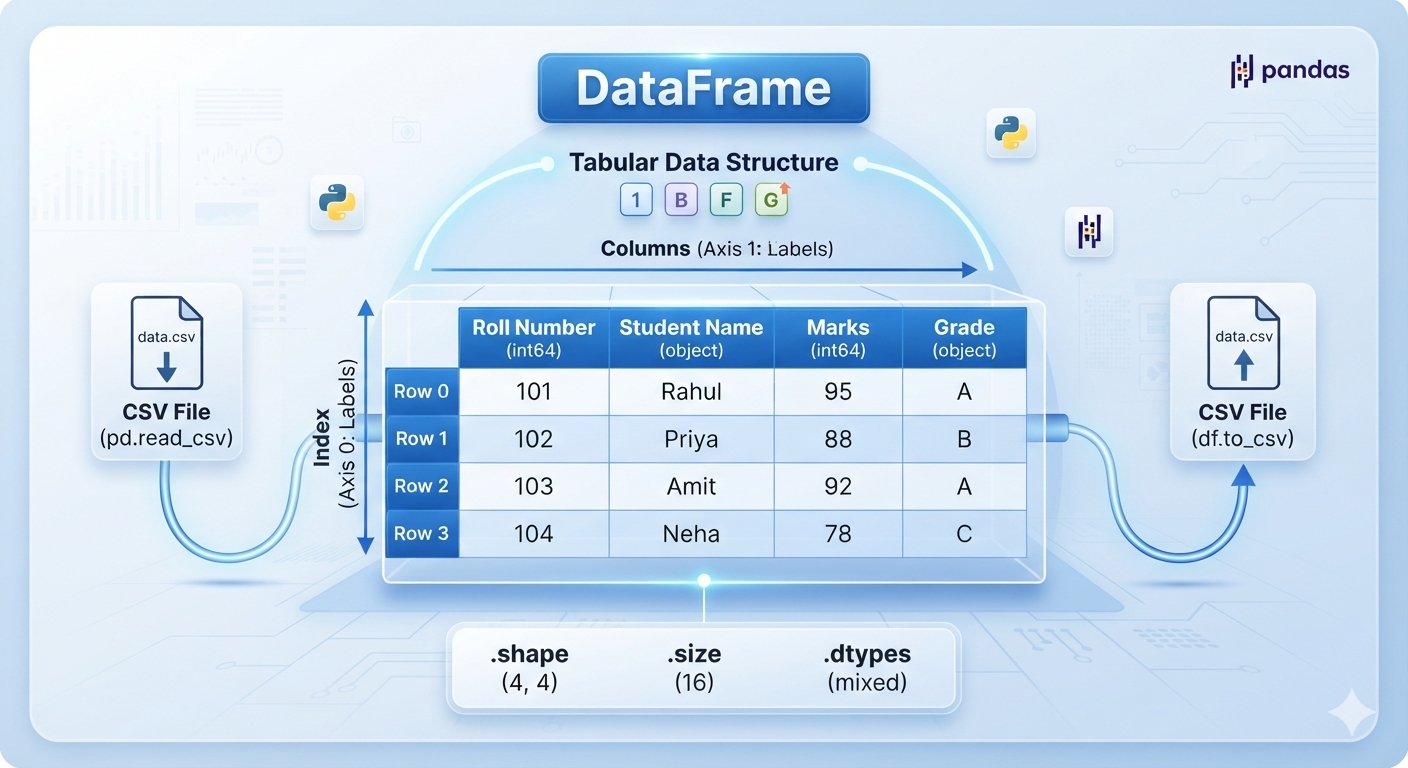
A DataFrame is a two-dimensional, size-mutable, and potentially heterogeneous tabular data structure with labeled axes (rows and columns). Think of it exactly like a MySQL table or a spreadsheet spreadsheet

1. Core Structural Attributes

Attributes do not use parentheses () because they return properties of the DataFrame rather than executing an action.
  • df.index: Returns the row labels (index) of the DataFrame.
  • df.columns: Returns the column labels of the DataFrame.
  • df.axes: Returns a list containing both the row axis labels and column axis labels.
  • df.dtypes: Returns the data type of each column.
  • df.size: Returns the total number of elements (Rows × Columns).
  • df.shape: Returns a tuple representing the dimensions (rows, columns).
  • df.values: Returns a NumPy ndarray representation of the data.
  • df.empty: Returns True if the DataFrame is completely empty; otherwise False.
  • df.T (Transpose): Flips the DataFrame, swapping its rows with its columns. 

2. Inspecting and Viewing Data

These methods are essential for taking a quick look at the dataset rows. 

.head(n)

Returns the first n rows of the DataFrame. If n is omitted, it defaults to showing the first 5 rows. 
# Displays the top 2 rows
print(df.head(2))

.tail(n)

Returns the last n rows of the DataFrame. If n is omitted, it defaults to showing the last 5 rows. 
# Displays the bottom 3 rows
print(df.tail(3))

3. Data Selection and Indexing

Students must understand the core distinction between label-based and integer-based indexing. [9]

.loc[] (Label-Based)

Selects a subset of rows and columns using their explicit names/labels. [9]
# Syntax: df.loc[row_label, column_label]
# Selects rows from 'Row1' to 'Row3' and only the 'Salary' column
print(df.loc['Row1':'Row3', 'Salary'])

.iloc[] (Integer-Based)

Selects rows and columns based strictly on their integer positions (starting from 0). 
# Syntax: df.iloc[row_position, column_position]
# Selects the first 2 rows and the first 3 columns
print(df.iloc[0:2, 0:3])

Boolean Indexing

Filtering rows based on a conditional statement.
# Filters rows where the Marks column is greater than 90
print(df[df['Marks'] > 90])

4. Basic Operations on Rows and Columns

The syllabus expects students to know how to dynamically modify the table structure. 

Adding & Selecting

  • Selecting a Column: df['Column_Name']
  • Adding a New Column: Assign values directly to a new key.
    df['Total_Marks'] = 100  # Sets all rows to 100
    

Deleting Rows and Columns

  • df.drop(): Used to drop columns or rows. For columns, students must specify axis=1.
    # Deleting a column
    df_new = df.drop('Age', axis=1)
    
    # Deleting a row by label
    df_new = df.drop('Row0', axis=0)
    
  • del Statement: Permanently removes a column in-place.
    del df['Age']

Renaming Labels

  • df.rename(): Alters row index labels or column labels.
    # Renaming a column header
    df.rename(columns={'OldName': 'NewName'}, inplace=True)

5. Iteration Methods

Iterating means traversing through the DataFrame row by row. The syllabus covers two distinct methods:

.iterrows()

Iterates over DataFrame rows as (index, Series) pairs.
for idx, row in df.iterrows():
    print(f"Row Index: {idx}")
    print(f"Student Name: {row['Name']}")

.iteritems() / .items()

Iterates over DataFrame columns as (column name, Series) pairs.
for col_name, col_data in df.items():
    print(f"Column Name: {col_name}")
    print(col_data)

6. Importing and Exporting Data (CSV Files)

Connecting external data text files to Python Pandas is a major practical and theory topic. 

pd.read_csv()

Loads data from a .csv file into a Pandas DataFrame structure. 
# Reading a CSV file
df = pd.read_csv('student_records.csv')

df.to_csv()

Exports the internal DataFrame structure out into a readable .csv file. 
# Exporting without saving row index numbers
df.to_csv('output_data.csv', index=False)


Comments 0


Mastering-Pandas-DataFrames-The-Ultimate-Guide-for-CBSE-Class-XII-Informatics-Practices-Code-065

For a student preparing for the CBSE Class XII Informatics Practices (Subject Code: 065) board exams under the 2026-2027 academic syllabus, mastering Pandas DataFrames is essential. Unit 1 (Data Handling using Pandas) carries a massive 25 marks in the theory paper. The CBSE curriculum explicitly focuses on specific attributes, structural properties, and manipulation methods. Writing or teaching anything outside this exact scope will cause information overload for students. Here is a comprehensive, student-friendly curriculum article covering every single DataFrame property and method required by the official syllabus.


Popular

  • Pandas DataFrames
  • Class XII IP Subject Code 065
  • Methods Used In DataFrames
  • Learning Pandas DataFrame For Class XII IP(065) CBSE

Shopeze.in

Shopeze.in

Aaja.in

Boost via Reels & Images

Learn Python

Learn Python By Gagan Khanna

Quick...

Professional Help for Growth

Tags

Pandas DataFrames Class XII IP Subject Code 065 Methods Used In DataFrames Learning Pandas DataFrame For Class XII IP(065) CBSE


Topics You may be intrested in


Teachlive is a platform dedicated to both teachers and students, providing free resources to help spread knowledge and benefit students in their educational journey. Under guidence of Seema Khanna ,at Teachlive, we offer much more than just academic support; we help students develop critical life skills, offer parental guidance, and keep everyone informed about the latest changes in the Indian education system.


Please Take a while to visit our sponsors website Shopeze.in - Home Decoration Items