Pandas Dataframes Explained In Simple Language
Pandas DataFrames

Pandas Dataframes Explained In Simple Language
Pandas DataFrames , Nov-28-2026
Understanding Pandas DataFrames: A Simple, Plain-Language Guide
If you have ever worked with a spreadsheet, an Excel sheet, or a database table, you already understand the basic idea behind a Pandas DataFrame.
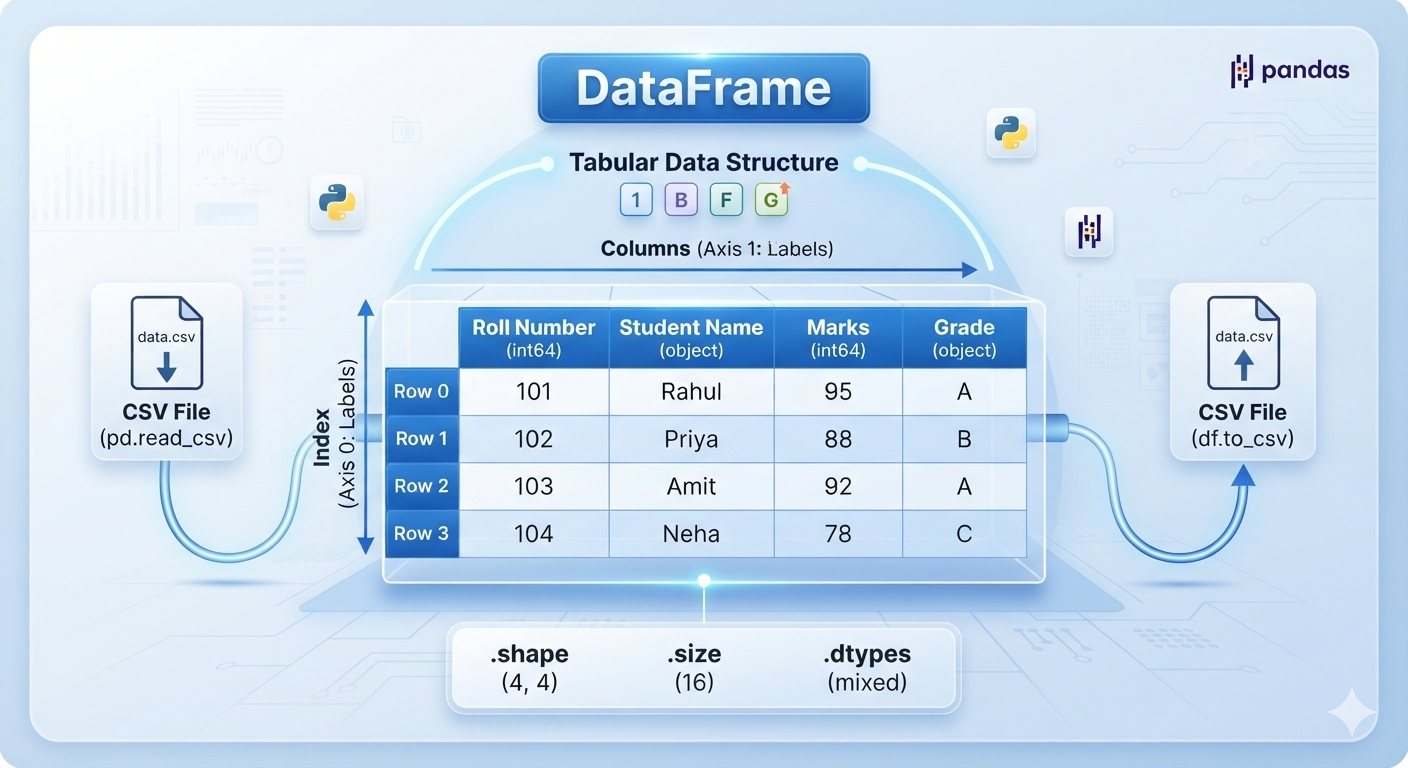
In plain words, a DataFrame is a two-dimensional table of data with rows and columns, where each row has an index label and each column has a name. While a Pandas Series is a single column (1D), a DataFrame is a collection of columns (2D) placed side by side.
1. Creating a DataFrame
You can create a DataFrame in several straightforward ways—most commonly from a Python dictionary of lists or from a CSV file.
Python
import pandas as pd

# Create a DataFrame from a dictionary
data = {
    "Name": ["Aarav", "Diya", "Kabir", "Meera"],
    "Age": [17, 16, 17, 16],
    "Score": [88, 94, 79, 91],
}

df = pd.DataFrame(data)
print(df)
Output:
Plaintext
     Name  Age  Score
0   Aarav   17     88
1    Diya   16     94
2   Kabir   17     79
3  Meera   16     91
- Each key in the dictionary (
"Name","Age","Score") becomes a column. - Each list becomes the values in that column.
- Pandas automatically creates a row index (
0, 1, 2, 3) unless you provide your own.
2. Checking Basic Information About a DataFrame
Before working with data, always inspect its shape, column names, and data types.
Python
df.shape      # (4, 3) -> 4 rows and 3 columns
df.columns    # Index(['Name', 'Age', 'Score'], dtype='object')
df.index      # RangeIndex(start=0, stop=4, step=1)
df.dtypes     # Data type of each column
df.head(2)    # First 2 rows
df.tail(2)    # Last 2 rows
df.info()     # Summary of rows, columns, non-null counts, and memory
df.describe() # Basic math summary (count, mean, min, max, etc.) for numeric columns
3. Selecting Columns and Rows
Selecting Columns
- Use a single column name to get a Series (one column).
- Use a list of column names to get a DataFrame (multiple columns).
Python
# Single column -> returns a Series
scores = df["Score"]

# Multiple columns -> returns a DataFrame
subset = df[["Name", "Score"]]
Selecting Rows with .loc and .iloc
.locselects by row label (index name)..ilocselects by row position (integer number starting at0).
Python
# Row at index 0 with all columns
df.loc[0]

# Specific row and specific column
df.loc[1, "Name"]       # 'Diya'
df.iloc[1, 0]          # 'Diya' (row 1, column 0)

# Slice rows by position (stop index is excluded in .iloc)
df.iloc[0:2]           # Rows 0 and 1
4. Filtering Rows Based on Conditions
Filtering lets you pick only the rows that match a rule.
Python
# Students with Score >= 90
top_students = df[df["Score"] >= 90]

# Combine two conditions with & (AND) or | (OR)
# Always put parentheses around each condition
high_and_17 = df[(df["Score"] >= 85) & (df["Age"] == 17)]
5. Adding, Updating, and Deleting Columns
You can create new columns from existing ones, change values, or remove columns you do not need.
Python
# Add a new column
df["Result"] = ["Pass", "Pass", "Pass", "Pass"]

# Calculate a column from existing data
df["Bonus_Score"] = df["Score"] + 5

# Update values
df.loc[2, "Score"] = 82

# Delete a column (returns a new DataFrame unless inplace=True)
df_clean = df.drop(columns=["Bonus_Score"])
6. Sorting Data
Sort rows by values in a column or by the row index.
Python
# Highest Score first
sorted_by_score = df.sort_values(by="Score", ascending=False)

# Sort by multiple columns
sorted_multi = df.sort_values(by=["Age", "Score"], ascending=[True, False])
7. Handling Missing Values
Real data often has empty or missing spots (NaN or None).
Python
# Check where values are missing
df.isna()

# Remove rows that have any missing value
df.dropna()

# Replace missing values with a default value (such as 0)
df.fillna(0)
8. Grouping and Summarizing (groupby)
groupby splits rows into groups based on a column and runs a calculation on each group—similar to a Pivot Table or GROUP BY in SQL.
Python
# Average Score grouped by Age
avg_by_age = df.groupby("Age")["Score"].mean()
print(avg_by_age)
Key Takeaways
- DataFrame = 2D Table: Rows + columns with labels, built from Series columns.
.locvs..iloc:.locuses labels/names;.ilocuses integer positions.- Filtering Uses Boolean Conditions: Wrap each condition in
(...)when joining with&or|. - Check Before You Transform: Use
.shape,.info(), and.isna()early so you know what your data actually looks like.
9. Reading and Exporting CSV Files with Selected Columns
In real projects, CSV files often contain dozens of columns when you only need a few—such as reading Name, Age, and Score from a full student record, or exporting only Name and Score to a clean report.
Reading Selected Columns from a CSV (usecols)
Use the usecols parameter in pd.read_csv() to load only the columns you specify instead of reading everything into memory first.
Python
import pandas as pd

# Read only specific columns by name
selected_cols = ["Name", "Age", "Score"]
df_selected = pd.read_csv("students.csv", usecols=selected_cols)
print(df_selected)
You can also pass column positions (integers) or a filter function to usecols:
Python
# Read columns at index positions 0 and 2
df_by_pos = pd.read_csv("students.csv", usecols=[0, 2])

# Read only columns whose names start with "Score"
df_by_prefix = pd.read_csv("students.csv", usecols=lambda col: col.startswith("Score"))
Exporting Selected Columns to a CSV (to_csv)
Select the columns you want in a list (such as df[["Name", "Score"]]) and call .to_csv(). Set index=False so Pandas does not write the row numbers (0, 1, 2...) as an extra column in the output file.
Python
# Export only Name and Score without the row index column
df[["Name", "Score"]].to_csv("student_scores.csv", index=False)
Combining Reading, Filtering, and Exporting in One Workflow
Python
# 1. Read only needed columns
df = pd.read_csv("students.csv", usecols=["Name", "Age", "Score"])

# 2. Filter rows and pick columns for export
top_report = df.loc[df["Score"] >= 85, ["Name", "Score"]]

# 3. Save clean CSV output without row index
top_report.to_csv("top_students.csv", index=False)
Quick Checklist for CSV Selection
- Load less data early: Pass
usecols=[...]topd.read_csv()when working with wide CSV files. - Keep output clean: Use
df[cols].to_csv("out.csv", index=False)to avoid extra unnamed index columns (Unnamed: 0when reloaded). - Check column names first: If a column name has spaces or capitalization differences, verify with
df.columnsbefore slicing.
DataFrame is a two-dimensional table of data with rows and columns, where each row has an index label and each column has a name. While a Pandas Series is a sin
Popular Keywords
-
Pandas DataFrames
-
Dataframes Explained
-
Operations On Dataframes
-
Gagan Khanna
Shopeze.in
Shopeze.in
Aaja.in
Boost via Reels & Images
Learn Python
Learn Python By Gagan Khanna
Quick...
Professional Help for Growth
Tags
Pandas DataFrames Dataframes Explained Operations On Dataframes Gagan Khanna



















































.png)



.png)

.png)




.png)









.png)


.png)

 NOW.png)

.pdf)

.png)









.png)







.jpeg)

.jpeg)

.png)












.png)
.png)
.png)


.png)








.jpg)


.jpg)


